您现在的位置是:网站首页> 编程资料编程资料
仅使用CSS做到完全居中的超级攻略CSS中的垂直和水平居中完全指南CSS中垂直居中的简单实现方法CSS实现定位元素居中的方法
 2023-10-24
280人已围观
2023-10-24
280人已围观
简介 这篇文章主要介绍了仅使用CSS做到完全居中效果的方法,强烈推荐!需要的朋友可以参考下
我们都知道 margin:0 auto; 的样式能让元素水平居中,而 margin: auto; 却不能做到垂直居中……直到现在。但是,请注意!想让元素绝对居中,只需要声明元素高度,并且附加以下样式,就可以做到:
- .Absolute-Center {
- margin: auto;
- position: absolute;
- top: 0; left: 0; bottombottom: 0; rightright: 0;
- }
我并不是第一个发现这种方法的人(不过我还是敢把它叫做“完全居中”),它有可能是种非常普遍的技巧。但大多数介绍垂直居中的文章中并没有提到过这种方法。
以前从未用过这种方法的我想试试,看看这种”完全居中”的方法到底有多么神奇。 好处:
跨浏览器,兼容性好(无需hack,可兼顾IE8~IE10)
无特殊标记,样式更精简
自适应布局,可以使用百分比和最大最小高宽等样式
居中时不考虑元素的padding值(也不需要使用box-sizing样式)
布局块可以自由调节大小
img的图像也可以使用
同时注意:
必须声明元素高度
推荐设置overflow:auto;样式避免元素溢出,显示不正常的问题
这种方法在Windows Phone上不起作用
浏览器支持:Chrome、Firefox、Safari、Mobile Safari、IE8-10。 “完全居中”经测试可以完美地应用在最新版本的Chrome、Firefox、Safari、Mobile Safari中,甚至也可以运行在IE8~IE10上
对照表
“完全居中”并不是本篇文章中唯一的选项。要做到垂直居中,还存在着其他方法,各有各的长处。采取什么样的方法,取决于你所支持的浏览器,以及现有标签的结构。下面这张对照表能够帮你选出最符合你需要的方法。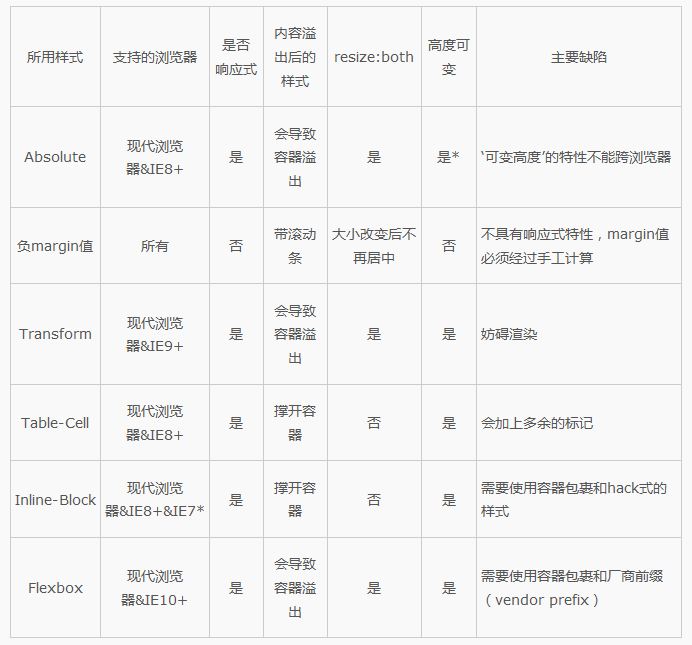
说明
在研究了规范和文档后,我总结出了“完全居中”的工作原理:
1.在普通文档流里,margin: auto; 的意思是设置元素的margin-top和margin-bottom为0。
W3.org If ‘margin-top’, or ‘margin-bottom’ are ‘auto’, their used value is 0.
2. 设置了position: absolute; 的元素会变成块元素,并脱离普通文档流。而文档的其余部分照常渲染,元素像是不在原来的位置一样。 Developer.mozilla.org …an element that is positioned absolutely is taken out of the flow and thus takes up no space
3. 设置了top: 0; left: 0; bottom: 0; right: 0; 样式的块元素会让浏览器为它包裹一层新的盒子,因此这个元素会填满它相对父元素的内部空间,这个相对父元素可以是是body标签,或者是一个设置了position: relative; 样式的容器。 Developer.mozilla.org For absolutely positioned elements, the top, right, bottom, and left properties specify offsets from the edge of the element’s containing block (what the element is positioned relative to).
4. 给元素设置了宽高以后,浏览器会阻止元素填满所有的空间,根据margin: auto; 的要求,重新计算,并包裹一层新的盒子。 Developer.mozilla.org The margin of the [absolutely positioned] element is then positioned inside these offsets.
5. 既然块元素是绝对定位的,又脱离了普通文档流,因此浏览器在包裹盒子之前会给margin-top和margin-bottom设置一个相等的值。 W3.org If none of the three [top, bottom, height] are ‘auto’: If both ‘margin-top’ and ‘margin-bottom’ are ‘auto’, solve the equation under the extra constraint that the two margins get equal values.?AKA: center the block vertically
使用“完全居中”,有意遵照了标准margin: auto; 样式渲染的规定,所以应当在与标准兼容的各种浏览器中起作用。
对齐
容器内对齐
使用“完全居中”,就可以在一个设置了position: relative的容器中做到完全居中元素了! (居中例子,请前往英文原文查看)
- .Center-Container {
- position: relative;
- }
- .Absolute-Center {
- width: 50%;
- height: 50%;
- overflow:
- margin: auto;
- position: absolute;
- top: 0; left: 0; bottombottom: 0; rightright: 0;
- }

接下来的示例会假设已经包含了以下样式,并且以逐步添加样式的方式提供不同的特性。
在可视区域内居中
想要使内容区在可视区域内居中么?设置position: fixed样式,并设置一个较高的z-index值,就可以做到。
- .Absolute-Center.is-Fixed {
- position: fixed;
- z-index: 999;
- }

移动版Safari的说明:如果外面没有一层设置position: relative的容器,内容区会以整个文档的高度的中心点为基准居中,而不是以可视区域的高度中心点为基准居中。
偏移值
如果需要添加固定的标题,或者其他带偏移样式的元素,可以直接把类似top: 70px; 的样式写进内容区域的样式中。一旦声明了margin: auto; 的样式,内容块的top left bottom right的属性值也会同时计算进去。
如果想让内容块在贴近侧边的过程中保持水平居中,可以使用right: 0; left: auto; 让内容贴在右侧,或者使用left: 0; right: auto; 使内容贴在左侧。
- .Absolute-Center.is-Fixed {
- position: fixed;
- z-index: 999;
- }

带响应式
使用absolute的最大好处就是可以完美地使用带百分比的宽高样式!就算是min-width/max-width或者min-height/max-height也能够有如预期般的表现。
再进一步加上padding样式的话,absolute式的完全居中也丝毫不会破坏!
- .Absolute-Center.is-Responsive {
- width: 60%;
- height: 60%;
- min-width: 200px;
- max-width: 400px;
- padding: 40px;
- }

带溢出内容
内容区高度大于可视区域或者一个position: relative的容器,其内容可能会溢出容器,或被容器截断。只要内容区域没有超出容器(没有给内容容器预留padding的话,可以设置max-height: 100%;的
相关内容
- 使用css外部样式表的方法css样式表中中文名字体乱码使用Unicode可解决HTML默认样式表CSS属性除了inline和block的定义CSS层叠样式表的层叠是什么意思(自我理解)CSS样式表高效使用技巧充分利用样式表的强大性CSS 样式表中文手册 chm格式CSS布局中如何组织样式表以便于简化、维护CSS样式表与格式布局详解
- 初探CSS3中的calc()功能CSS3 calc()会计算属性详解详解CSS 3 中的 calc() 方法浅谈css3中calc在less编译时被计算的解决办法CSS3 Calc实现滚动条出现页面不跳动问题 CSS3的calc()做响应模式布局的实现方法使用CSS3中的calc()属性来以算式表达尺寸数值浅析CSS中calc()的使用巧用CSS3的calc()宽度计算做响应模式布局的方法
- CSS3中HSL和HSLA的简单使用示例css3中transform属性实现的4种功能详解CSS3.0(Cascading Style Sheet) 层叠级联样式表纯CSS3实现div按照顺序出入效果CSS3实现列表无限滚动/轮播效果css3 利用transform-origin 实现圆点分布在大圆上布局及旋转特效CSS3实现的侧滑菜单CSS3实现的3D隧道效果用CSS3画一个爱心css3 实现文字闪烁效果的三种方式示例代码六种css3实现的边框过渡效果
- 天天酷跑最新葫芦侠修改器稳定刷分教程推荐_手机游戏_游戏攻略_
- 全民飞机大战刷金币_全民飞机大战3月10日叉叉助手刷金币攻略_手机游戏_游戏攻略_
- 全民飞机大战安卓版攻略_3月10日叉叉助手刷分刷金币教程推荐_手机游戏_游戏攻略_
- 全民飞机大战刷金币攻略_最新叉叉助手刷金币教程推荐_手机游戏_游戏攻略_
- 天天飞车无限隐身教程_天天飞车3月10日无限隐身最新攻略推荐_手机游戏_游戏攻略_
- 我叫MT疑似蓝卡BUG 无法抗野德承受黑龙七万暴击依然坚挺_手机游戏_游戏攻略_
- 全民飞机大战巅峰飞跃多少钱 好不好_手机游戏_游戏攻略_